
Firmware Updates for AI SafetyCam
A new AI SafetyCam firmware update delivers improved performance and reliability. The update provides better battery efficiency, stronger network connectivity, faster and more dependable video retrievals, and smoother handling of auxiliary cameras. Existing devices will automatically update once they are connected.
A new firmware update (v3.15.15) is being rolled out for the AI SafetyCam, delivering performance and stability improvements for Azuga customers. The update enhances overall efficiency with improvements in battery optimization, connectivity performance, video retrieval reliability, and auxiliary camera handling.
Key Improvements in This Release:
- Battery Optimization:
- Supports better long-term battery health through optimized power usage.
- Ensures improved standby behavior and maintains stable operation over extended periods.
- Connectivity Efficiency:
- Improves overall network communication stability.
- Enhances network handling for smoother and more consistent data transmission.
- Increases reconnection success rates during transitions between different network states.
- Strengthens connection reliability by reducing communication dropouts.
- Video Retrieval Improvements:
- Backend processes for retrieving recorded clips have been optimized.
- These enhancements provide faster processing and quicker video transfers to the portal.
- Reliability of video retrieval has been improved, ensuring more consistent access to requested and other critical video clips.
- Auxiliary Camera Enhancements:
- Improves stability and performance for setups using auxiliary cameras.
- Refines auxiliary camera interactions to ensure smoother multi-camera operation.
- Enhances video retrieval reliability and performance for auxiliary camera recordings.
Firmware Version Details:
- New Firmware Version: 3.15.15
- Update Mode: Existing cameras will automatically update to the latest software version once they establish a connection.
How to Check the Update:
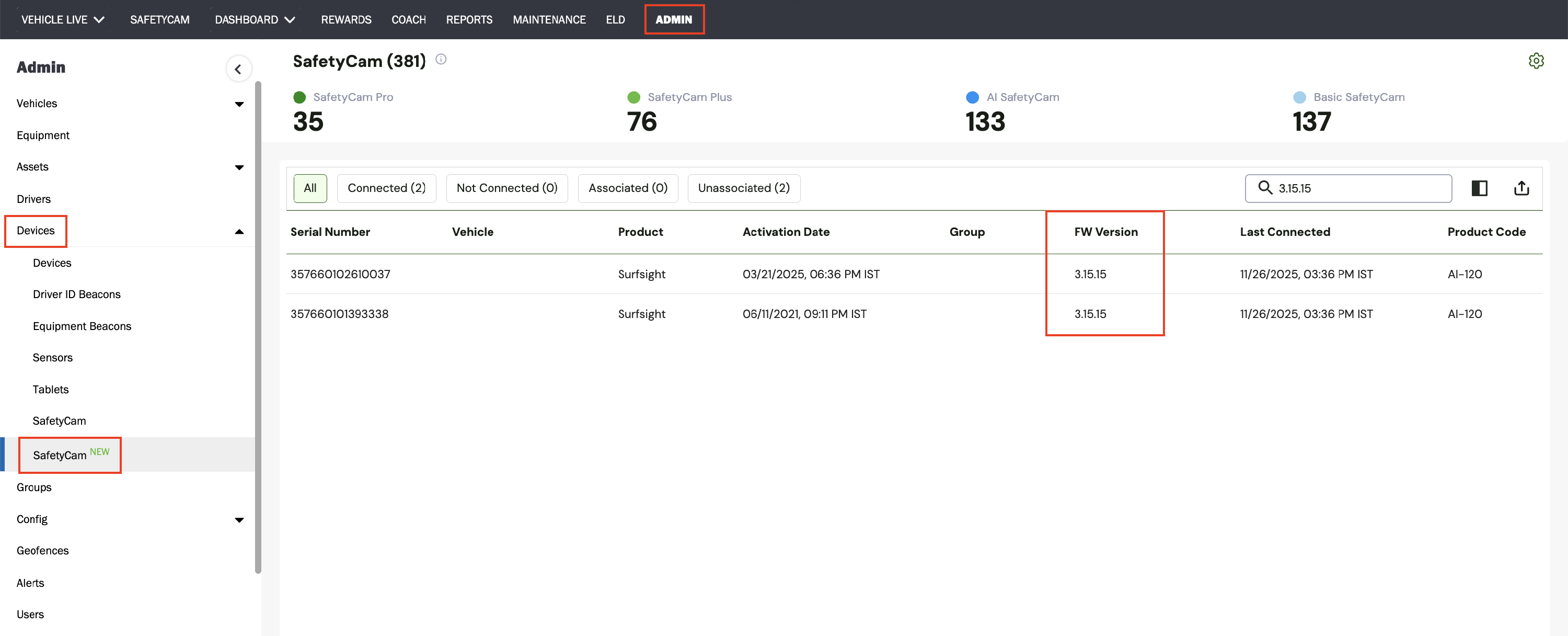
Fleet managers can confirm the firmware version directly in the Azuga Fleet web portal:
- Go to Admin > Devices > SafetyCam New
- Select the relevant camera by its serial number
- View the firmware version displayed on the device details page. It should show 3.15.15 after the update.
PDF copy of the Release Notes: Firmware Updates for AI SafetyCam - November 2025